

The Calls Dashboard
Calls > Dashboard opens on an overview of the whole workspace: how many calls have been processed, the average score, and your own recent scored calls. Click View All to go deeper, or pick any category from the left to see how your team is doing on that conversation type. A category dashboard leads with four numbers - Total Calls, Internal Participants, Avg. Score, and Internal Participant Talk Time - then breaks the period down further:- Scores over time, with the range of calls behind each point, so you can see both the average and how spread out the calls were
- Score distribution across Gold, Silver, and Bronze
- A card per attribute, turning what you capture into patterns worth acting on: which objections raised come up most, how calls split across call type, where deals sit by deal stage or call outcome
- Skill performance, the same view as roleplay analytics, for the skills tied to your scorecard criteria
- Participants, listing everyone evaluated on this conversation type with their call counts and averages
- Leaderboard, ranking people by Best Score Average and by Greatest Score Lift, so improvement shows up alongside raw performance
Call History and a scored call
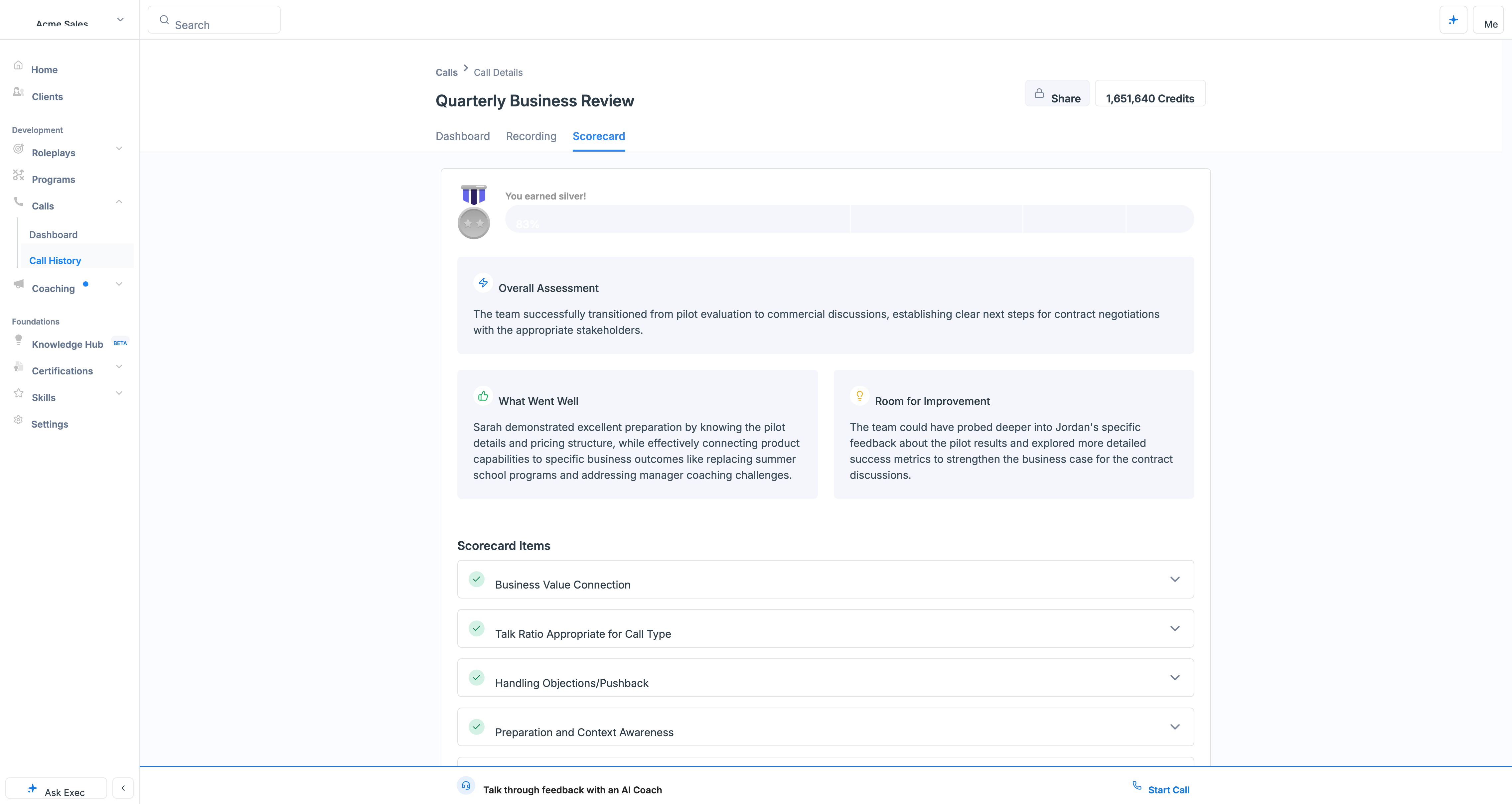
Call History lists every scored call, with filters and a Download Report (you can customize the columns). Save the filter combinations you use often as custom views - one per team, or per conversation type. Click a row to peek at the call in a side panel without leaving the list, expand it to full screen, or open the call itself. A scored call has three tabs:- Dashboard - a Call Summary of what happened and the purpose of the conversation, the participants, and the captured attributes, plus a scorecard summary
- Recording - the recording alongside the full transcript
- Scorecard - the same scorecard you built in the category settings, graded for this call. Each criterion shows its grade with reasons it scored well, and for anything less than Good, where it missed and how to improve
Turn a real call into practice
The most useful thing to do with a call that went badly is practice it. On any scored call, click Create > Scenario to open Scenario Studio with that call already attached, so the generated roleplay is built from the real conversation - the customer’s actual objections, the real context, the moment it went sideways. Edit from there like any other scenario. You’ll only see this if your role allows creating scenarios.Fix a miscategorized call
Occasionally a call lands in the wrong category and gets graded on the wrong scorecard - a sales conversation scored as customer success, say. To move it:1
Choose the right category
On the call (or from the category cell in Call History), click Choose Category and select the correct one.
2
Confirm the change
Exec warns you what you’ll lose before applying it. Click Confirm.
3
Rescore on the new scorecard
The call is flagged as having changed category. Click the retry button, or open the call and reanalyze it, to grade it against the new category’s scorecard.
When a call isn’t scored
Not every imported call gets a score, and Call History tells you why. Some reasons are permanent, others you can act on:
Open the call and click Score This Call or Retry Scoring once you’ve fixed the cause.