

Before You Start
- The roleplay must use evaluation criteria imported from a rubric
- You must have editing access to the roleplay
How to Add Scenario-Specific Instructions
1
Open the Evaluation Criteria section
Open the roleplay you want to edit, scroll to Evaluation Criteria, and click Edit.
2
Select the criterion to customize
Find the rubric criterion you want to adjust, click next to it and select Edit.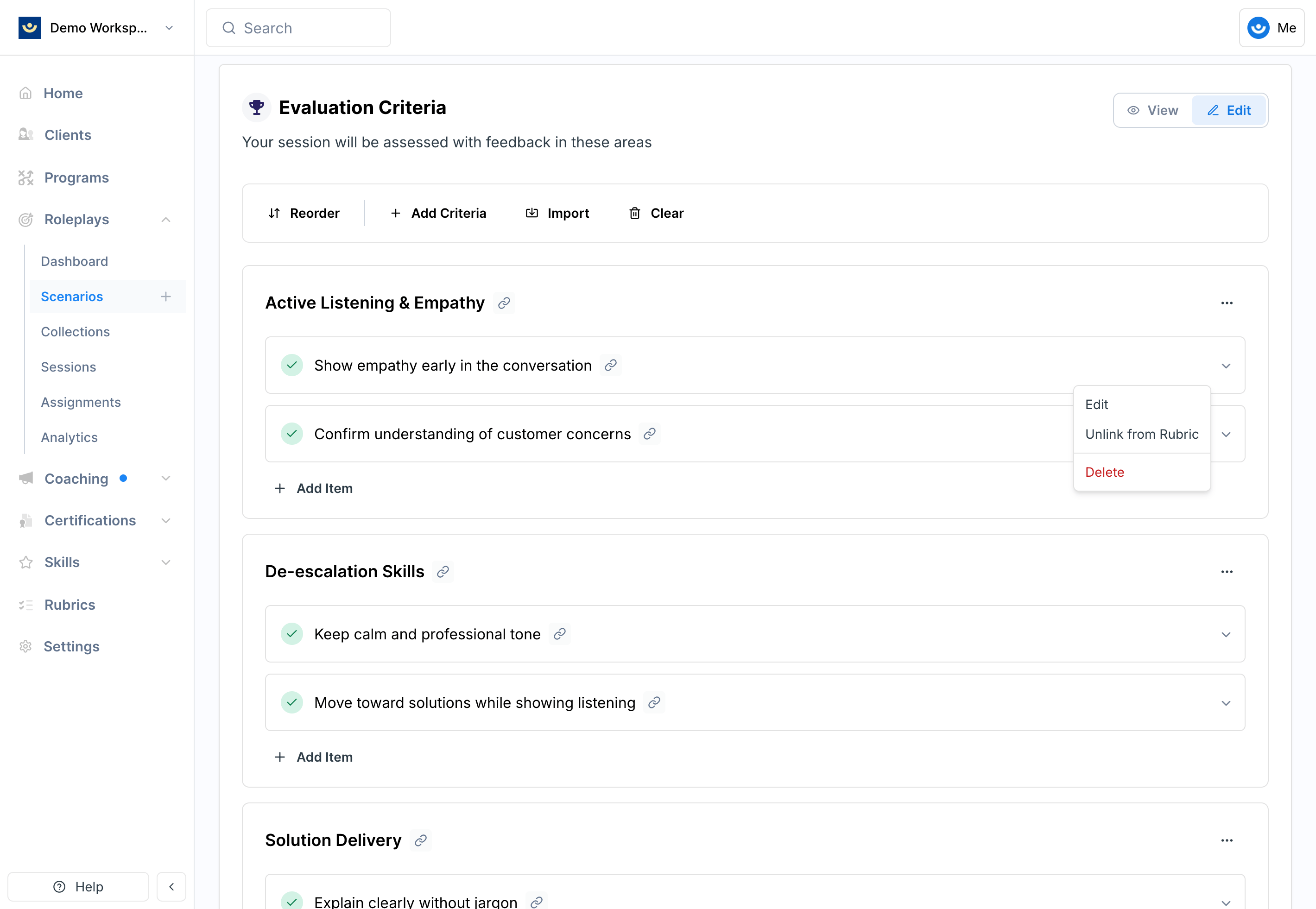
3
Add your instructions
Inside the criterion editor, find the Scenario-Specific Instructions section and add guidance that applies only to this roleplay.For example, if the rubric criterion is Discovery and Needs Uncovering with general guidance to “ask at least two open-ended questions,” you could add: “At least one open-ended question must uncover the customer’s current pain points with their logistics vendor.”
4
Save your changes
Click Save Changes. The criterion will now display the scenario-specific context, which will be used during grading for this roleplay only.
How Scenario-Specific Instructions Work
- They supplement rubric criteria — they don’t replace them
- They apply only to the current scenario, not other roleplays using the same rubric
- They are factored in during evaluation and scoring
Tips
- Keep instructions clear and measurable — vague guidance won’t improve grading consistency
- Add only what’s unique — avoid duplicating language already in the rubric
- Use this instead of editing the rubric when customization is limited to one scenario