> ## Documentation Index
> Fetch the complete documentation index at: https://docs.exec.com/llms.txt
> Use this file to discover all available pages before exploring further.
# Skills Overview
> Track and develop key competencies across your workspace
Skills let you define the competencies that matter to your organization and track how people develop them over time through AI roleplays and real calls. Whether you are measuring objection handling, discovery techniques, or empathy, skills give you a structured way to see where your team excels and where they need support.
## Video walkthrough
## How Skills Work
Create skills that represent the competencies your team needs to develop — things like "Rapport Building," "Needs Analysis," or "Closing Techniques." Each skill gets a name and description.
[Learn how to create and manage skills →](/skills/create-and-manage)
Skills connect to the specific behaviors in your rubrics. When you create a rubric criterion item like "Asks open-ended discovery questions," you link it to a skill like "Discovery." Exec can do this automatically using AI, or you can set it up manually.
[Learn about skill tagging →](/skills/create-and-manage#how-skills-connect-to-scenarios)
As learners complete roleplays and have their calls scored, their performance on each criterion feeds into the associated skills. Over time, this builds into a proficiency score that reflects their current capability.
## Two Ways to Measure Skills
Exec provides two complementary views of skill data, each answering a different question:
**"How did these sessions go?"**
Performance shows results for the specific sessions you are looking at. It changes when you apply filters like date range, scenario, or group — that is by design.
**Metrics:** First score, Best score, Average, Lift
**Where:** Roleplay Analytics, Scenario Analytics, Call Analytics
[View skill performance →](/skills/analyze-performance)
**"How skilled is this person overall?"**
Proficiency is a stable measure of a person's overall capability. It weighs recent activity more heavily and combines data from roleplays and calls. It does not change based on analytics filters.
**Metrics:** Weighted score, Proficiency tier, Lift
**Where:** Skills page, Skill Reports
[View skill proficiency →](/skills/proficiency-reports)
**Performance** reflects specific sessions you have filtered to. **Proficiency** reflects a person's overall capability and stays stable regardless of filters. Both are valuable — performance helps you evaluate specific training, while proficiency gives you the big picture.
## Understanding Score Tiers
Proficiency tiers represent a person's overall capability level for a skill, based on all their recent activity.
| Tier | Score Range | What it means |
| -------------- | ------------ | ------------------------------------- |
| **Excellent** | 90 and above | Consistently demonstrates mastery |
| **Proficient** | 75–89 | Solid, reliable capability |
| **Developing** | 50–74 | Building competency, showing progress |
| **Needs Work** | Below 50 | Requires focused development |
Session score tiers appear in analytics drilldowns and heatmaps. They reflect how a person performed in individual sessions.
| Tier | Score Range |
| --------------------- | ------------ |
| **Good** | 75 and above |
| **Fair** | 25–74 |
| **Needs Improvement** | Below 25 |
## Where Skills Appear
| Surface | What you see | Who it is for | Learn more |
| ---------------------- | -------------------------------------------------- | ---------------- | -------------------------------------------------------------------------------------- |
| **Skills page** | Workspace-wide proficiency per skill | Admins | [Proficiency & Reports](/skills/proficiency-reports) |
| **Skill Reports** | Proficiency heatmaps by person or group | Admins, Managers | [Proficiency & Reports](/skills/proficiency-reports) |
| **Roleplay Analytics** | Performance metrics for filtered roleplay sessions | Admins, Managers | [Analyze Performance](/skills/analyze-performance) |
| **Scenario Analytics** | Performance metrics for a specific scenario | Admins, Managers | [Analyze Performance](/skills/analyze-performance#scenario-specific-analytics) |
| **Call Analytics** | Performance metrics for scored calls | Admins, Managers | [Analyze Performance](/skills/analyze-performance#skill-performance-in-call-analytics) |
## The Skills Dashboard
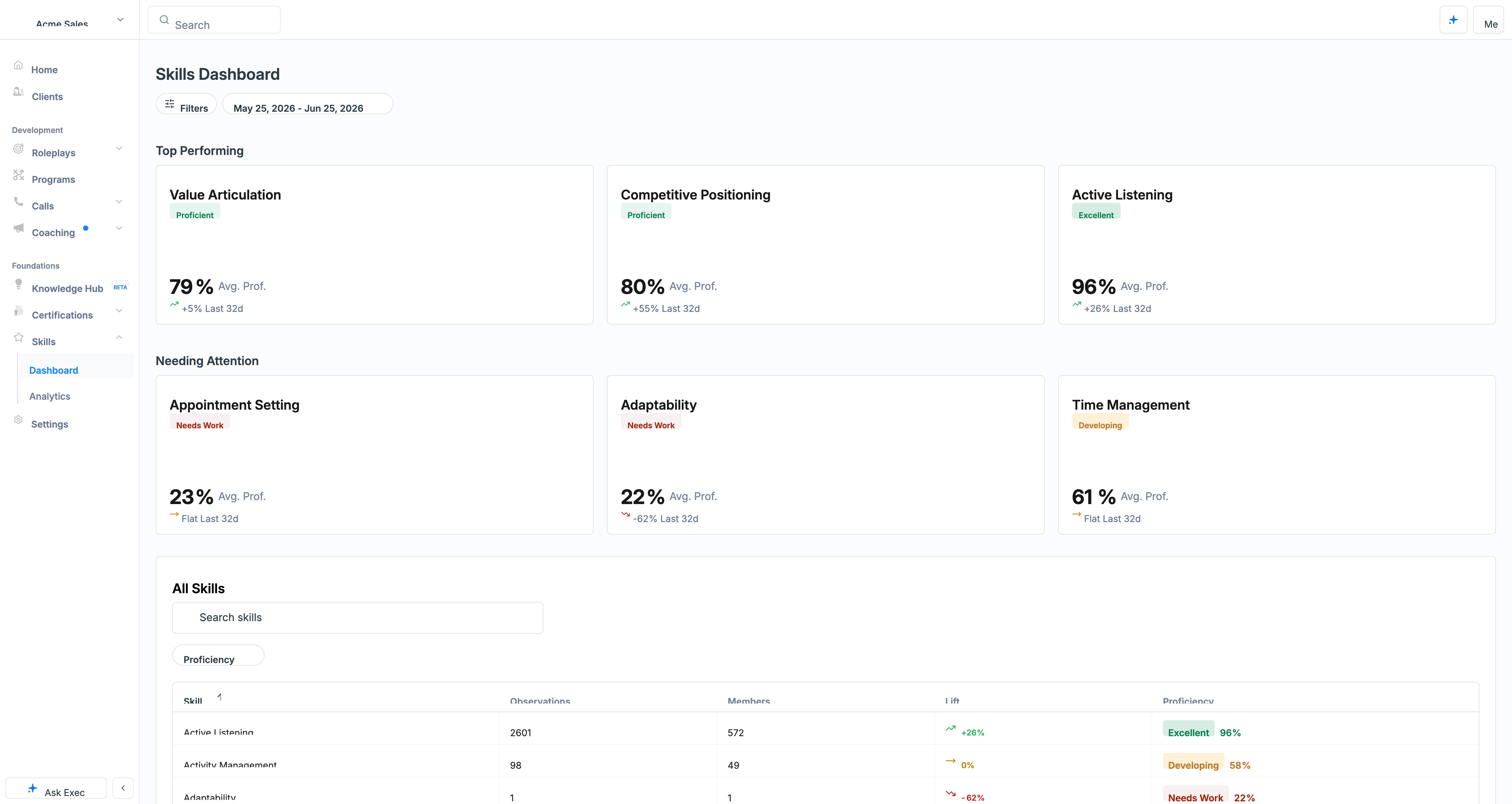
Click **Skills** in the navigation to open the **Dashboard**. Filter by a date range to see which skills are **Top Performing** and which are **Needing Attention** across your workspace, with the full list of skills below (some may not have data yet).
 Click any skill to open its [detail view](/skills/insights-and-resources):
* **Skill Health** - an overall proficiency percentage plus member counts and how many need coaching
* **Member Proficiency** and proficiency **over time**, with a per-member table showing each person's **observations** (the number of sessions where the skill was tied to a criterion) and feedback
* Filter by user or group, **Download Report**, and a **Resources** tab listing the roleplays and Knowledge Hub items tied to the skill
Save a filter as a reusable **view** (for example, "Account Executives") to check the same team each time. The **Analytics** page offers the same heatmaps for deeper analysis.
### AI Analyst
On a skill's dashboard, open the **AI Analyst** to chat about why a team is excelling or struggling on that skill. It can **Create custom AI Roleplay** to practice the skill or **Create a guide** as a Knowledge Hub page, right from the conversation. For the full walkthrough of the skill dashboard, the Resources tab, and the AI Analyst, see [Skill Insights and Resources](/skills/insights-and-resources).
## Managing Your Skills Library
A full set of skills is loaded into every workspace by default. Manage them under **Settings > Skills**: click **Create Skill** to add one, or the **"..." menu > Edit Skill** to change a skill's **name**, **description**, and its **Auto-tag to new content** toggle. We recommend leaving auto-tag on, so every new scenario's evaluation criteria automatically pick up the right skills and start collecting data. See [Create and Manage Skills](/skills/create-and-manage).
## Dive deeper
Define skills, link them to rubric criteria, and manage your library.
A skill's dashboard, its linked roleplays and guides, and the AI Analyst.
Session-level performance across roleplays, scenarios, and calls.
Long-term proficiency scores, heatmaps, and custom reports.
What your skill scores mean and how to improve them.
## Getting Help
**Need help setting up skills?** Contact us at [hello@exec.com](mailto:hello@exec.com) for guidance on defining skills, connecting them to your rubrics, or interpreting your analytics.
Click any skill to open its [detail view](/skills/insights-and-resources):
* **Skill Health** - an overall proficiency percentage plus member counts and how many need coaching
* **Member Proficiency** and proficiency **over time**, with a per-member table showing each person's **observations** (the number of sessions where the skill was tied to a criterion) and feedback
* Filter by user or group, **Download Report**, and a **Resources** tab listing the roleplays and Knowledge Hub items tied to the skill
Save a filter as a reusable **view** (for example, "Account Executives") to check the same team each time. The **Analytics** page offers the same heatmaps for deeper analysis.
### AI Analyst
On a skill's dashboard, open the **AI Analyst** to chat about why a team is excelling or struggling on that skill. It can **Create custom AI Roleplay** to practice the skill or **Create a guide** as a Knowledge Hub page, right from the conversation. For the full walkthrough of the skill dashboard, the Resources tab, and the AI Analyst, see [Skill Insights and Resources](/skills/insights-and-resources).
## Managing Your Skills Library
A full set of skills is loaded into every workspace by default. Manage them under **Settings > Skills**: click **Create Skill** to add one, or the **"..." menu > Edit Skill** to change a skill's **name**, **description**, and its **Auto-tag to new content** toggle. We recommend leaving auto-tag on, so every new scenario's evaluation criteria automatically pick up the right skills and start collecting data. See [Create and Manage Skills](/skills/create-and-manage).
## Dive deeper
Define skills, link them to rubric criteria, and manage your library.
A skill's dashboard, its linked roleplays and guides, and the AI Analyst.
Session-level performance across roleplays, scenarios, and calls.
Long-term proficiency scores, heatmaps, and custom reports.
What your skill scores mean and how to improve them.
## Getting Help
**Need help setting up skills?** Contact us at [hello@exec.com](mailto:hello@exec.com) for guidance on defining skills, connecting them to your rubrics, or interpreting your analytics.