> ## Documentation Index
> Fetch the complete documentation index at: https://docs.exec.com/llms.txt
> Use this file to discover all available pages before exploring further.
# Session Visibility
> Understand who can see your practice session data
Practice sessions on Exec are visible to certain people based on their role and relationship to you. Here's how it works.
***
## Who Can See Your Sessions
| Role | What they see |
| :----------------------------- | :------------------------------------------------------------ |
| **You** | All your own sessions |
| **Workspace Admins** | All sessions in the workspace |
| **Your Manager** (Group Admin) | All sessions from their group members |
| **Scenario Monitors** | Sessions on scenarios they monitor (if monitoring is enabled) |
| **Shared Users** | Sessions you explicitly share with them |
Workspace admins and managers can see your sessions to support coaching and track team progress — similar to how managers access performance data in other workplace tools.
***
## Controlling Monitor Visibility
Scenario creators can control whether monitors have access to session data. This setting is in the scenario's Share modal under **Allow session monitoring**.
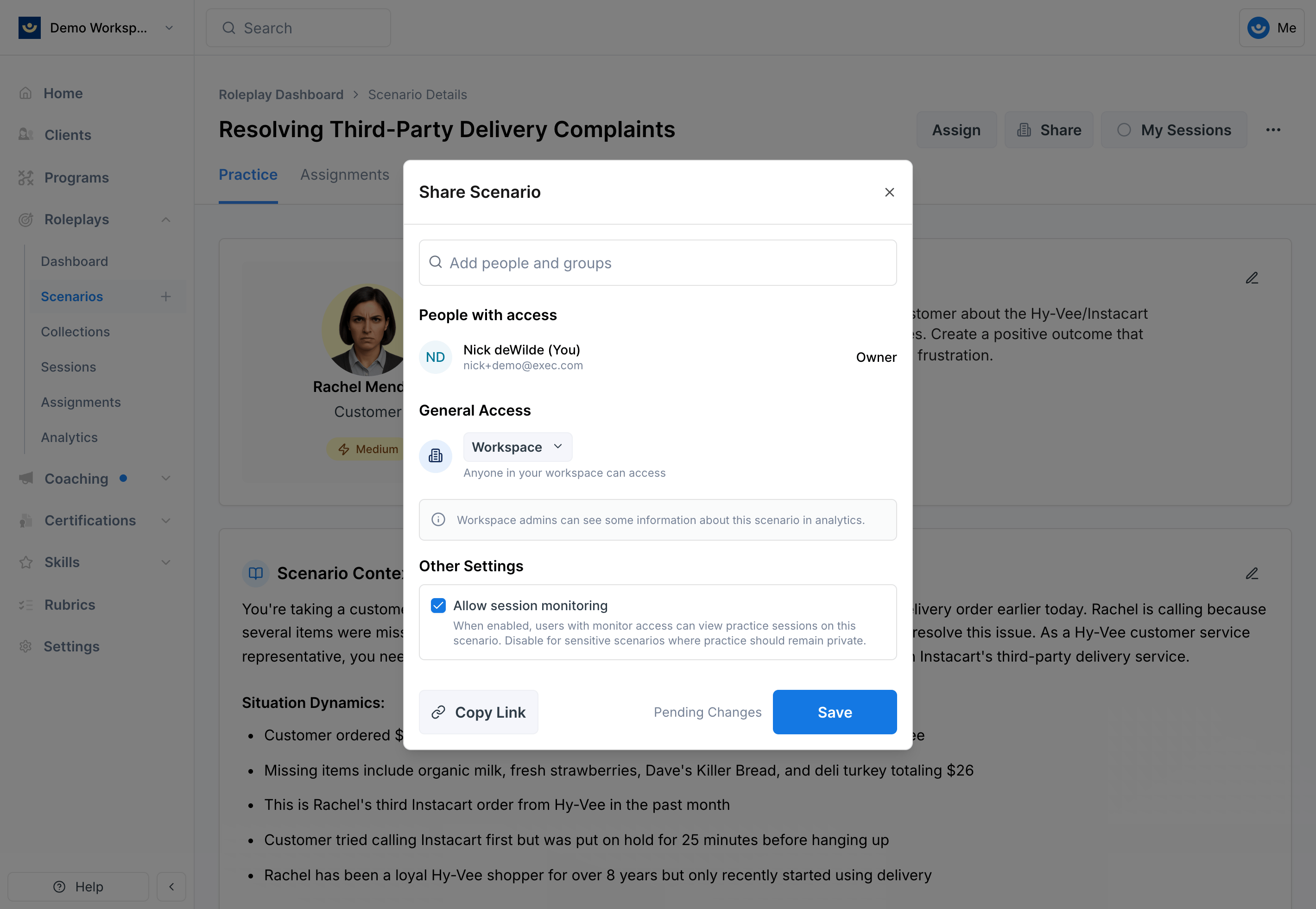 * **On (default)** — Scenario monitors and editors can view practice sessions
* **Off** — Sessions are only visible to admins, managers, and users you explicitly share with
Consider turning off session monitoring for sensitive scenarios — like difficult conversations or performance reviews — where learners may want more privacy.
***
## What's Visible in a Session
When someone has access to your sessions, they can see:
* Session recording and transcript
* AI feedback and scores
* Completion status and date
***
## Analytics Visibility
The analytics dashboard shows aggregated session data:
* **Workspace Admins** see analytics for all users
* **Group Admins** see analytics for their group members only
* **Regular users** see only their own analytics
Learn more in [Admin capabilities](/platform/admin-capabilities).
***
## Getting Help
**Need help?** Contact us at [hello@exec.com](mailto:hello@exec.com) for any questions about session visibility or privacy settings.
* **On (default)** — Scenario monitors and editors can view practice sessions
* **Off** — Sessions are only visible to admins, managers, and users you explicitly share with
Consider turning off session monitoring for sensitive scenarios — like difficult conversations or performance reviews — where learners may want more privacy.
***
## What's Visible in a Session
When someone has access to your sessions, they can see:
* Session recording and transcript
* AI feedback and scores
* Completion status and date
***
## Analytics Visibility
The analytics dashboard shows aggregated session data:
* **Workspace Admins** see analytics for all users
* **Group Admins** see analytics for their group members only
* **Regular users** see only their own analytics
Learn more in [Admin capabilities](/platform/admin-capabilities).
***
## Getting Help
**Need help?** Contact us at [hello@exec.com](mailto:hello@exec.com) for any questions about session visibility or privacy settings.