> ## Documentation Index
> Fetch the complete documentation index at: https://docs.exec.com/llms.txt
> Use this file to discover all available pages before exploring further.
# Customize Instructions per Scenario
> Add scenario-specific grading guidance without modifying the original rubric
When you import a rubric into a roleplay, the evaluation criteria come with standardized guidance. Sometimes you need to add more specific grading instructions for a particular scenario — without changing the rubric itself or affecting other roleplays that use it.
***
## Before You Start
* The roleplay must use evaluation criteria imported from a rubric
* You must have editing access to the roleplay
Scenario-specific instructions only work for criteria linked to a rubric template.
You will not be able to access scenario-specific instructions for roleplays that do not have a rubric imported
***
## How to Add Scenario-Specific Instructions
Open the roleplay you want to edit, scroll to **Evaluation Criteria**, and click **Edit**.
Find the rubric criterion you want to adjust, click next to it and select **Edit**.
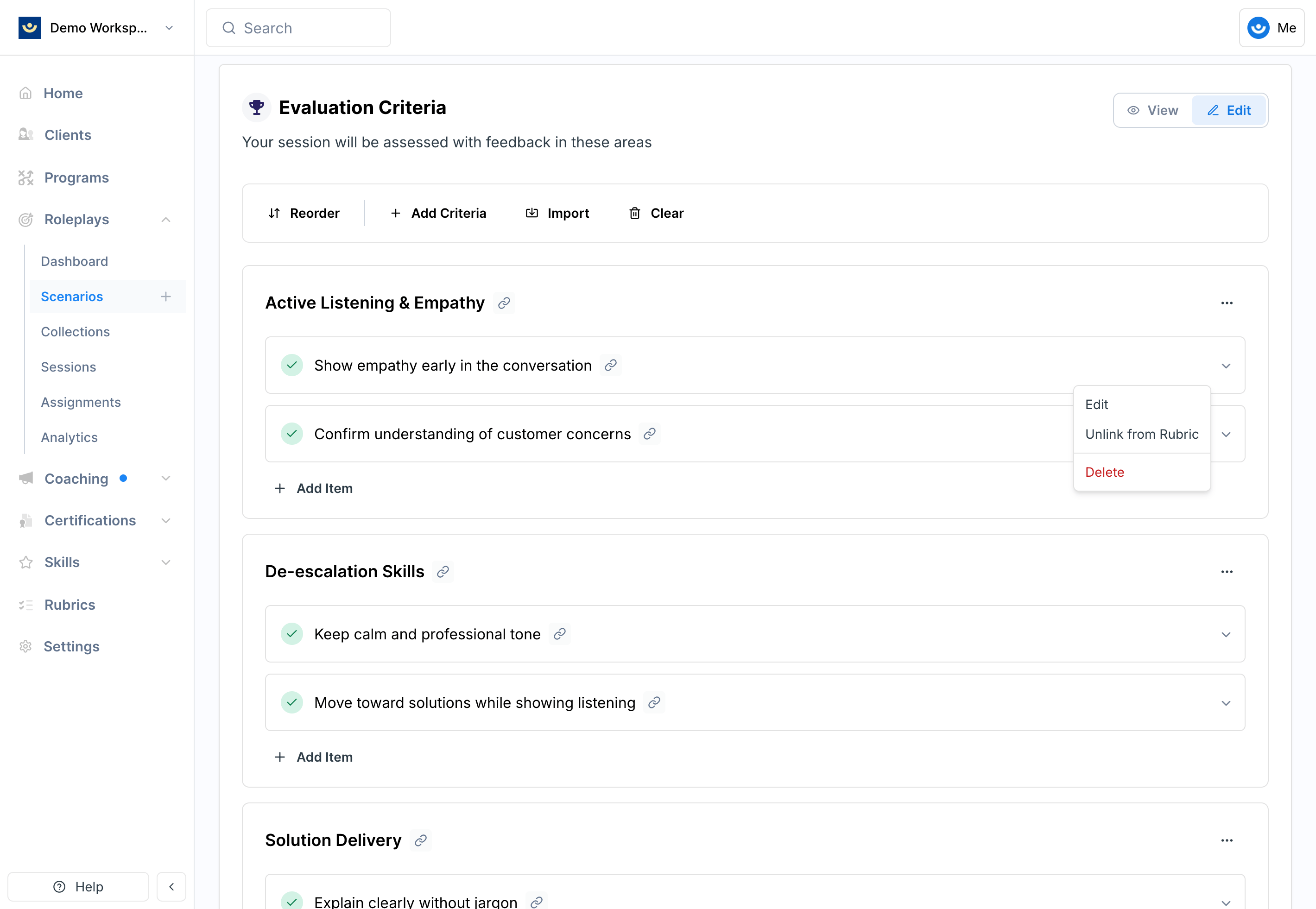 Inside the criterion editor, find the **Scenario-Specific Instructions** section and add guidance that applies only to this roleplay.
For example, if the rubric criterion is *Discovery and Needs Uncovering* with general guidance to "ask at least two open-ended questions," you could add: *"At least one open-ended question must uncover the customer's current pain points with their logistics vendor."*
Click **Save Changes**. The criterion will now display the scenario-specific context, which will be used during grading for this roleplay only.
***
## How Scenario-Specific Instructions Work
* They supplement rubric criteria — they don't replace them
* They apply only to the current scenario, not other roleplays using the same rubric
* They are factored in during evaluation and scoring
***
## Tips
* **Keep instructions clear and measurable** — vague guidance won't improve grading consistency
* **Add only what's unique** — avoid duplicating language already in the rubric
* **Use this instead of editing the rubric** when customization is limited to one scenario
***
## Getting Help
**Need help?** Contact us at [hello@exec.com](mailto:hello@exec.com) for guidance on customizing evaluation criteria or any questions about rubrics.
Inside the criterion editor, find the **Scenario-Specific Instructions** section and add guidance that applies only to this roleplay.
For example, if the rubric criterion is *Discovery and Needs Uncovering* with general guidance to "ask at least two open-ended questions," you could add: *"At least one open-ended question must uncover the customer's current pain points with their logistics vendor."*
Click **Save Changes**. The criterion will now display the scenario-specific context, which will be used during grading for this roleplay only.
***
## How Scenario-Specific Instructions Work
* They supplement rubric criteria — they don't replace them
* They apply only to the current scenario, not other roleplays using the same rubric
* They are factored in during evaluation and scoring
***
## Tips
* **Keep instructions clear and measurable** — vague guidance won't improve grading consistency
* **Add only what's unique** — avoid duplicating language already in the rubric
* **Use this instead of editing the rubric** when customization is limited to one scenario
***
## Getting Help
**Need help?** Contact us at [hello@exec.com](mailto:hello@exec.com) for guidance on customizing evaluation criteria or any questions about rubrics.