> ## Documentation Index
> Fetch the complete documentation index at: https://docs.exec.com/llms.txt
> Use this file to discover all available pages before exploring further.
# Filter to Find a Roleplay
> Search and filter to quickly find the scenario you need
Exec's scenario library includes everything from global collections available to all users to workspace-specific and personal scenarios. Here's how to find what you need quickly.
***
## Search
Go to the **Scenarios** tab and use the search bar to type in a keyword or part of the scenario name. The list narrows automatically as you type.
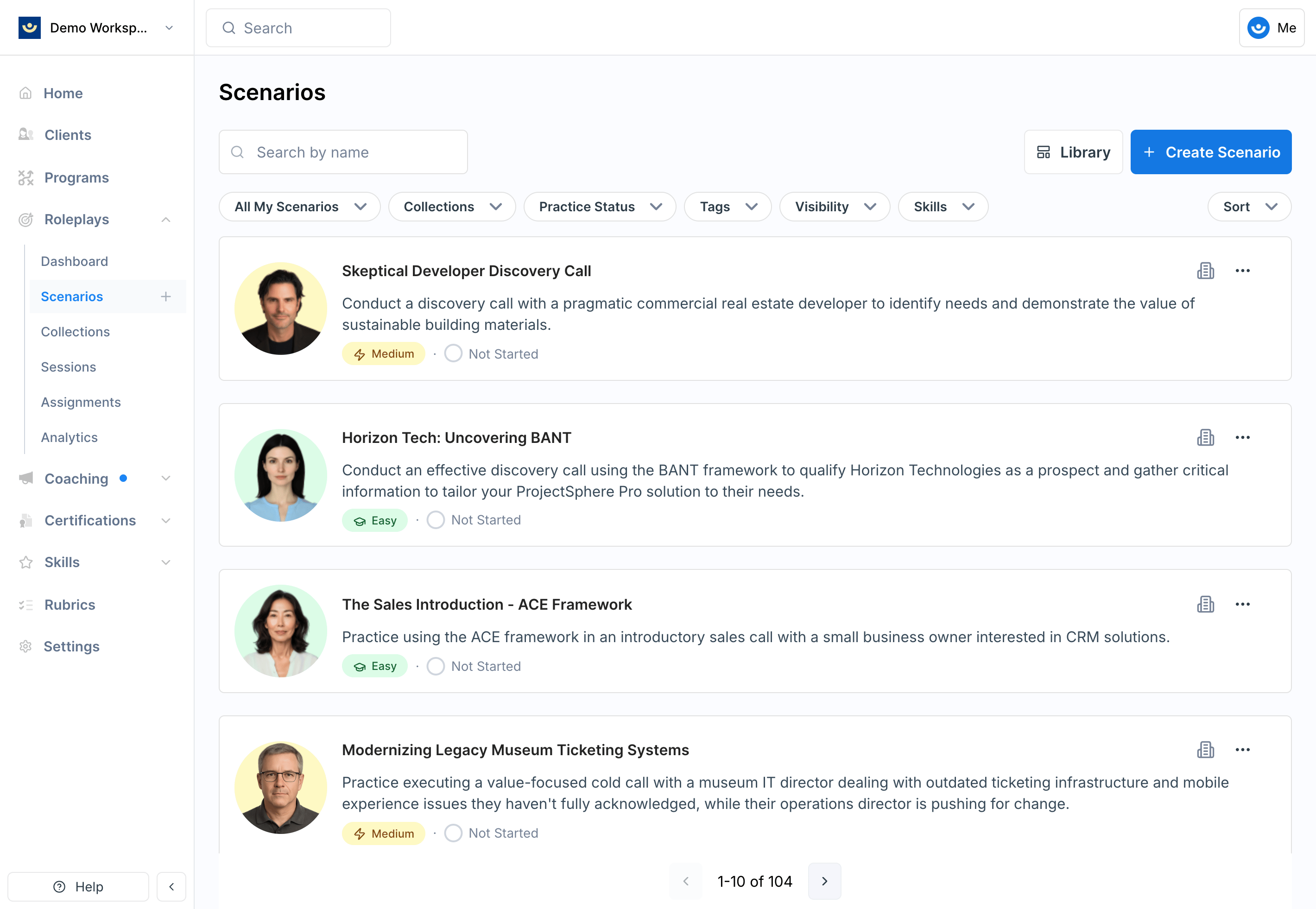 This is the fastest option when you already know what you're looking for.
***
## Filter
Use filters to narrow the list without scrolling through everything. You can filter by:
Show only scenarios grouped in a specific collection (e.g., Interview Practice).
Filter by scenarios you've already practiced or ones you've never tried.
Find scenarios by skill, topic, or theme (e.g., coaching, difficult conversations).
Filter by where the scenario lives:
* **Private** — personal scenarios visible only to you
* **Workspace** — available to everyone in your organization
* **Global** — provided to all Exec users
Filter by scenarios you created vs. scenarios created by someone else.
Filter by the skills being practiced in a scenario (e.g., discovery, objection handling, rapport building).
***
## Tips
* **Start broad, then narrow** — browse collections if you're not sure what you need; use filters once you have a clearer goal
* **Use tags for skill-based discovery** — tags like "negotiation" or "feedback conversations" surface relevant scenarios quickly
* **Check your practice history** — filtering by practiced vs. never practiced helps you balance reinforcement with new challenges
* **Explore global scenarios** — professionally designed and a great starting point before moving into customized workspace scenarios
***
## Getting Help
**Need help?** Contact us at [hello@exec.com](mailto:hello@exec.com) for any questions about finding or organizing scenarios.
This is the fastest option when you already know what you're looking for.
***
## Filter
Use filters to narrow the list without scrolling through everything. You can filter by:
Show only scenarios grouped in a specific collection (e.g., Interview Practice).
Filter by scenarios you've already practiced or ones you've never tried.
Find scenarios by skill, topic, or theme (e.g., coaching, difficult conversations).
Filter by where the scenario lives:
* **Private** — personal scenarios visible only to you
* **Workspace** — available to everyone in your organization
* **Global** — provided to all Exec users
Filter by scenarios you created vs. scenarios created by someone else.
Filter by the skills being practiced in a scenario (e.g., discovery, objection handling, rapport building).
***
## Tips
* **Start broad, then narrow** — browse collections if you're not sure what you need; use filters once you have a clearer goal
* **Use tags for skill-based discovery** — tags like "negotiation" or "feedback conversations" surface relevant scenarios quickly
* **Check your practice history** — filtering by practiced vs. never practiced helps you balance reinforcement with new challenges
* **Explore global scenarios** — professionally designed and a great starting point before moving into customized workspace scenarios
***
## Getting Help
**Need help?** Contact us at [hello@exec.com](mailto:hello@exec.com) for any questions about finding or organizing scenarios.