> ## Documentation Index
> Fetch the complete documentation index at: https://docs.exec.com/llms.txt
> Use this file to discover all available pages before exploring further.
# Reschedule a Coaching Session
> Move a booked coaching session to a new time
You can move any upcoming session to a different time from its detail page. As long as you reschedule under the 24-hour cancellation and reschedule policy, there's no extra charge - your credits simply carry over to the new time.
Need to drop the session entirely instead of moving it? See [Cancel a Coaching Session](/coaching/cancel-session) for how cancellations and refunds work.
***
## How to reschedule
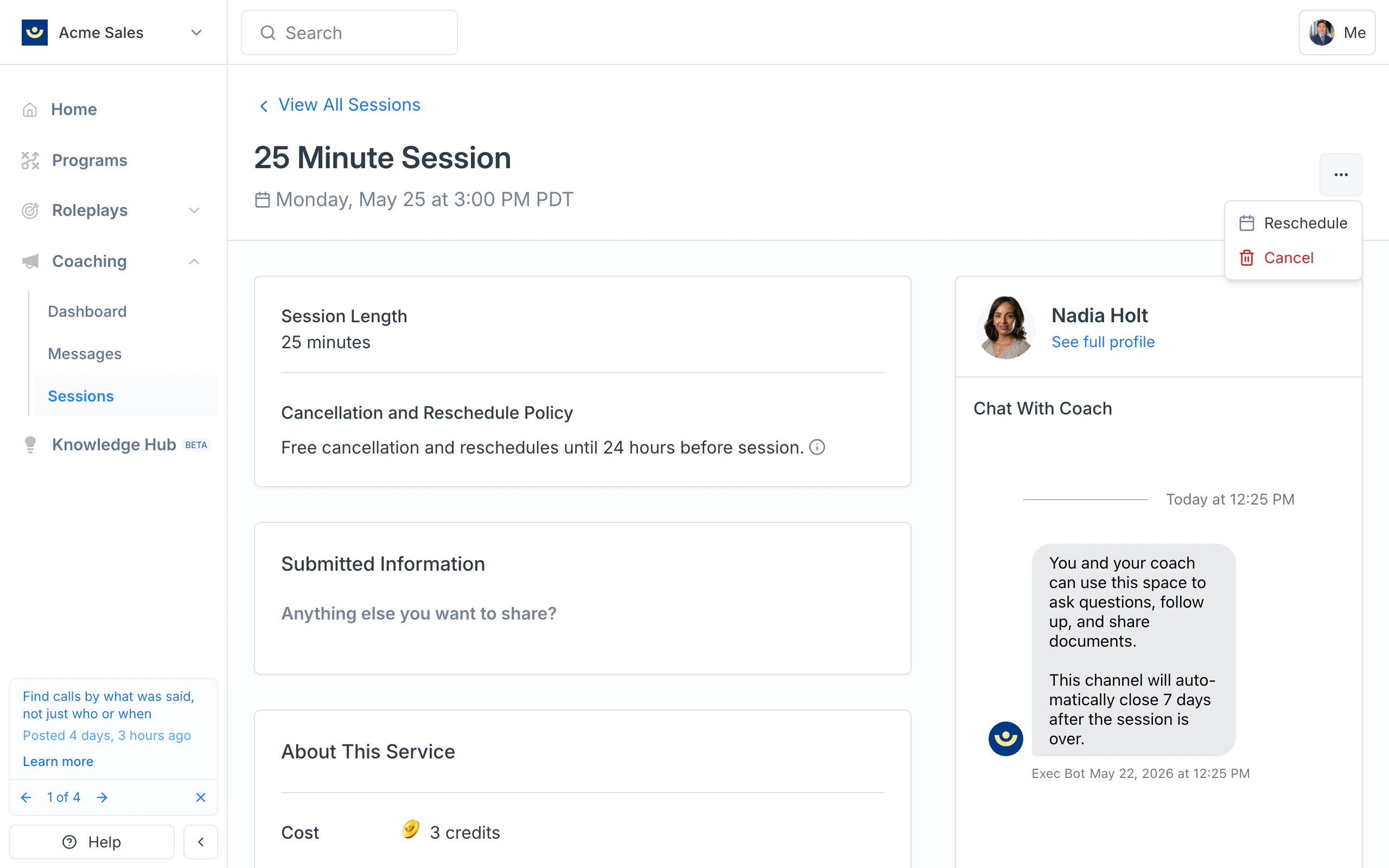
Go to **Coaching > Sessions** in the sidebar, open the upcoming session you want to move, and click the three-dot menu in the top-right of the session header. Choose **Reschedule**.
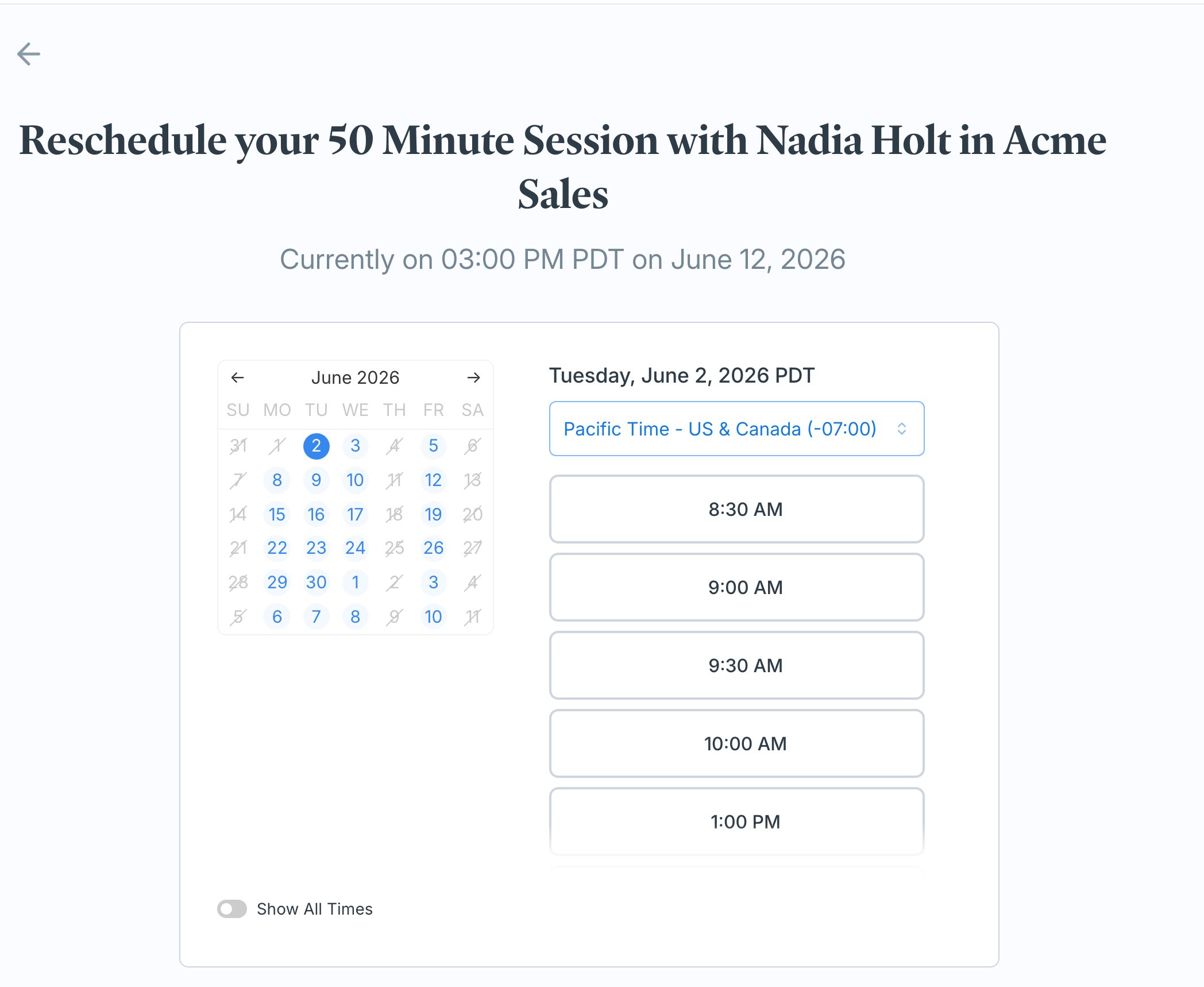
 The reschedule page shows when the session is currently scheduled, along with a calendar of your coach's open times. Pick a new day on the calendar, then choose an available time slot. Times are shown in your local timezone, which you can change with the dropdown.
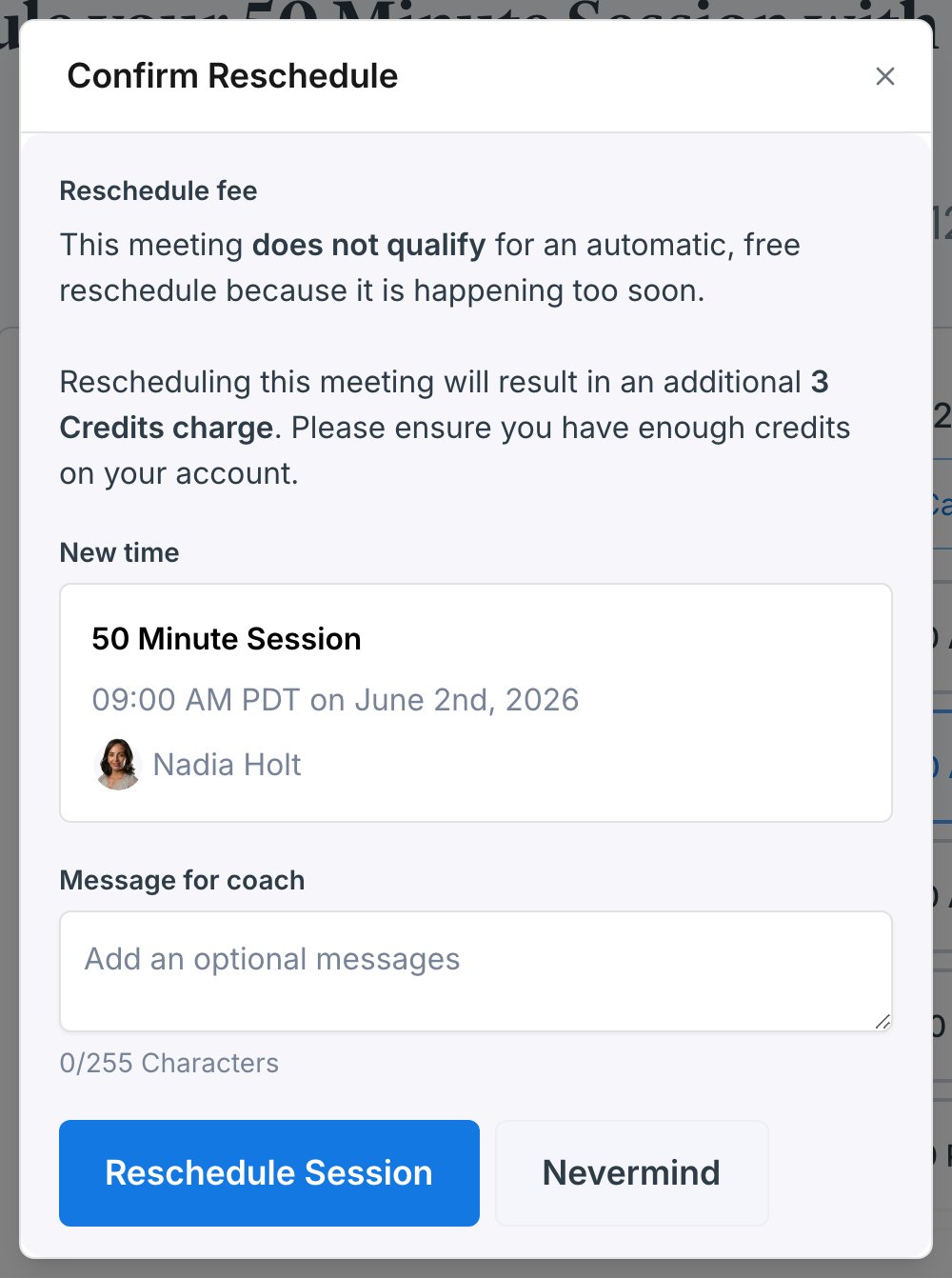
 A **Confirm Reschedule** dialog summarizes the new time and whether any reschedule fee applies. Add an optional message for your coach if you'd like, then click **Reschedule Session**. Changed your mind? Click **Nevermind** to close without moving anything.
 ***
## Reschedule policy
Reschedules follow the same **24-hour cancellation and reschedule policy** as cancellations: reschedule at least 24 hours before the session starts and there's no charge. The exact window is shown on the session detail page under **Cancellation and Reschedule Policy**.
* **More than 24 hours before the session** - the **Confirm Reschedule** dialog shows that the meeting qualifies for a free reschedule, and your credits carry over to the new time at no extra cost.
* **Less than 24 hours before the session** - the dialog warns that the session no longer qualifies for a free reschedule because it's happening too soon, and moving it costs an additional charge in credits. Make sure you have enough credits on your account, or reach out to your coach or [hello@exec.com](mailto:hello@exec.com) if you need an exception.
***
## What happens after you reschedule
Once the reschedule goes through:
* The session moves to the new time and shows the updated time in your **Sessions** list and on your **Coaching Dashboard**.
* You and your coach both get an email with the new details, including any message you added.
* The original time is released, so another learner can book it.
***
## If your coach reschedules
Coaches can also propose a new time from their side - for example, if something comes up on their schedule. When that happens you'll get an **email** with the new time, and the session updates to the new slot in your Sessions list. If the time doesn't work for you, open the session and reschedule it again or [cancel it](/coaching/cancel-session).
***
## Getting help
If a time you expected isn't available, a reschedule won't go through, or you were charged for a reschedule you think should have been free, email [hello@exec.com](mailto:hello@exec.com) and we'll sort it out.
***
## Reschedule policy
Reschedules follow the same **24-hour cancellation and reschedule policy** as cancellations: reschedule at least 24 hours before the session starts and there's no charge. The exact window is shown on the session detail page under **Cancellation and Reschedule Policy**.
* **More than 24 hours before the session** - the **Confirm Reschedule** dialog shows that the meeting qualifies for a free reschedule, and your credits carry over to the new time at no extra cost.
* **Less than 24 hours before the session** - the dialog warns that the session no longer qualifies for a free reschedule because it's happening too soon, and moving it costs an additional charge in credits. Make sure you have enough credits on your account, or reach out to your coach or [hello@exec.com](mailto:hello@exec.com) if you need an exception.
***
## What happens after you reschedule
Once the reschedule goes through:
* The session moves to the new time and shows the updated time in your **Sessions** list and on your **Coaching Dashboard**.
* You and your coach both get an email with the new details, including any message you added.
* The original time is released, so another learner can book it.
***
## If your coach reschedules
Coaches can also propose a new time from their side - for example, if something comes up on their schedule. When that happens you'll get an **email** with the new time, and the session updates to the new slot in your Sessions list. If the time doesn't work for you, open the session and reschedule it again or [cancel it](/coaching/cancel-session).
***
## Getting help
If a time you expected isn't available, a reschedule won't go through, or you were charged for a reschedule you think should have been free, email [hello@exec.com](mailto:hello@exec.com) and we'll sort it out.