> ## Documentation Index
> Fetch the complete documentation index at: https://docs.exec.com/llms.txt
> Use this file to discover all available pages before exploring further.
# Call Categories and Scorecards
> Define conversation types, the attributes you capture, and the scorecards calls are graded on
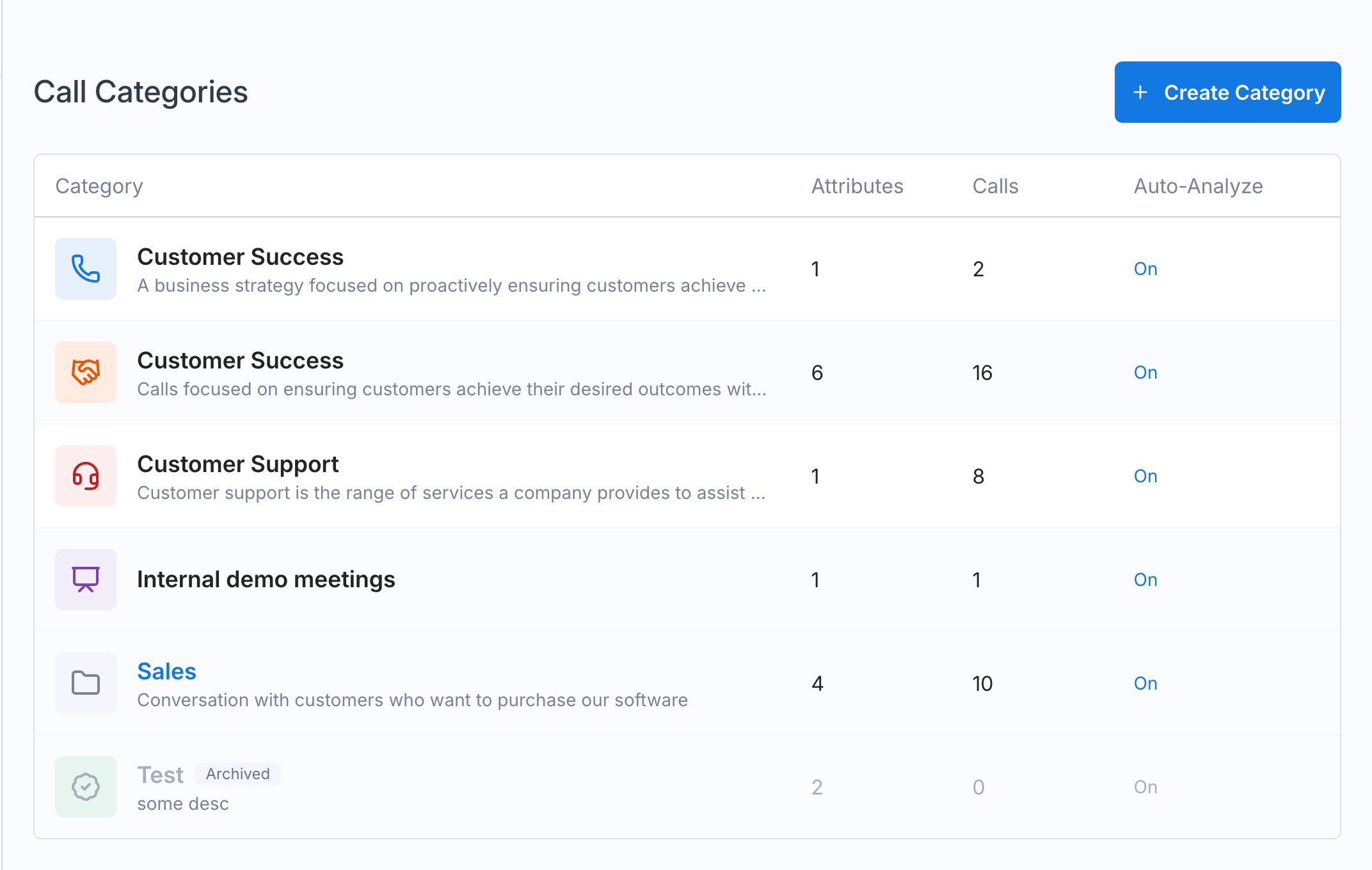
Categories are the heart of call scoring. Each category is a type of conversation, and it defines what Exec captures from those calls (attributes), how it grades them (scorecards), and how it summarizes them. Manage them under **Settings > Calls > Categories**.
## Categories
Categories are folders for your conversation types, such as **Customer Success**, **Customer Support**, **Internal**, **Recruiting**, and **Sales**. A templated set comes built in; click **Create Category** to add your own. Each category has an **Automatically analyze future calls in this category** toggle and three tabs: **Attributes**, **Scorecards**, and **Call Summaries**.
 It's common to turn off the default attributes you don't need and keep just the few that matter to your team. Toggle any attribute on or off from the Attributes tab.
## Attributes
Attributes are the structured data Exec pulls out of each call in a category. Every attribute has a **Type** (**Single-Select**, **Multi-Select**, **Text**, or **True/False**) and instructions that tell the scoring system how to identify it.
* A **call type** attribute (single-select) lists the conversation types within a category (for example, for Customer Success: onboarding and implementation, general check-in, QBR, renewal and expansion). Its instructions help Exec accurately identify the category and the specific conversation type.
* An **objections raised** attribute can capture the objections that come up on sales calls, so you can see the most common ones across the workspace and decide what coaching or roleplays to build around them.
Toggle attributes on or off, edit the built-in ones, or create your own to capture exactly what your team cares about.
## Scorecards
A category's **Scorecard** is built exactly like a roleplay's evaluation criteria: each item has **Good**, **Fair**, and **Poor** descriptions, and calls are graded against them. For each item you can:
* **Generate with AI** the Good / Fair / Poor descriptions
* Generate or associate a **skill**, so call performance feeds the same [skill analytics](/skills/analyze-performance) as roleplays
* Set a **weighted point** value, so more important criteria count for more
Build the scorecard around what you want to see for that conversation type, for example discovery, handling objections, talk ratio, business value, introductions, and closing and next steps.
A handy shortcut: build a roleplay for the conversation first, then transfer its evaluation criteria into the call scorecard.
### Conditional criteria
**Conditional criteria** are scorecard items that only apply when an attribute has a specific value. For example, add criteria that should only be graded when the **call type** is onboarding and implementation. Click **Add conditional criteria**, select the attribute and the value, and build the items. Calls in that category get the base scorecard plus any conditional criteria that match their attributes.
## Call Summaries
The **Call Summaries** tab is where you give instructions for how calls in this category should be summarized, including what to include and how to structure it. If you leave it blank, Exec uses a sensible default, similar to a roleplay session summary.
## Next step
Once calls are importing and scoring, see [Review Scored Calls](/calls/review-scored-calls) to track performance.
## Getting Help
**Need help?** Contact us at [hello@exec.com](mailto:hello@exec.com) for guidance on building categories and scorecards.
It's common to turn off the default attributes you don't need and keep just the few that matter to your team. Toggle any attribute on or off from the Attributes tab.
## Attributes
Attributes are the structured data Exec pulls out of each call in a category. Every attribute has a **Type** (**Single-Select**, **Multi-Select**, **Text**, or **True/False**) and instructions that tell the scoring system how to identify it.
* A **call type** attribute (single-select) lists the conversation types within a category (for example, for Customer Success: onboarding and implementation, general check-in, QBR, renewal and expansion). Its instructions help Exec accurately identify the category and the specific conversation type.
* An **objections raised** attribute can capture the objections that come up on sales calls, so you can see the most common ones across the workspace and decide what coaching or roleplays to build around them.
Toggle attributes on or off, edit the built-in ones, or create your own to capture exactly what your team cares about.
## Scorecards
A category's **Scorecard** is built exactly like a roleplay's evaluation criteria: each item has **Good**, **Fair**, and **Poor** descriptions, and calls are graded against them. For each item you can:
* **Generate with AI** the Good / Fair / Poor descriptions
* Generate or associate a **skill**, so call performance feeds the same [skill analytics](/skills/analyze-performance) as roleplays
* Set a **weighted point** value, so more important criteria count for more
Build the scorecard around what you want to see for that conversation type, for example discovery, handling objections, talk ratio, business value, introductions, and closing and next steps.
A handy shortcut: build a roleplay for the conversation first, then transfer its evaluation criteria into the call scorecard.
### Conditional criteria
**Conditional criteria** are scorecard items that only apply when an attribute has a specific value. For example, add criteria that should only be graded when the **call type** is onboarding and implementation. Click **Add conditional criteria**, select the attribute and the value, and build the items. Calls in that category get the base scorecard plus any conditional criteria that match their attributes.
## Call Summaries
The **Call Summaries** tab is where you give instructions for how calls in this category should be summarized, including what to include and how to structure it. If you leave it blank, Exec uses a sensible default, similar to a roleplay session summary.
## Next step
Once calls are importing and scoring, see [Review Scored Calls](/calls/review-scored-calls) to track performance.
## Getting Help
**Need help?** Contact us at [hello@exec.com](mailto:hello@exec.com) for guidance on building categories and scorecards.